Assess
PTxray · free
- Currency
- Security
- Best practices
IBM Power · AIX · IBM i
Free, read-only PTxray checks AIX, VIOS and IBM i: 600+ checks on AIX and VIOS, 134 on IBM i. See what it finds the same day you run it.
Read-only. Runs privately. We see nothing unless you upload it.
Environment assessment ready
Preparing environment view
Power is incredibly reliable, so a lot of shops stop looking at it. That's luck, not a security posture. Meanwhile the people who know these systems are harder to find, and every month you wait, the gap gets wider.
69% of IBM i shops name skills their top concern.
Fortra 2026 IBM i Marketplace Survey54% of organizations say their most recent serious outage cost over $100,000.
Uptime Institute Annual Outage Analysis 2025John DeMaris has led systems from never patched to fully maintained, more than once. At Adventist HealthCare, that meant taking Linux systems to a 30-day patch cycle. Before PowerTrue, he did Power work at Nationwide Insurance and LightEdge Solutions.
Client, Linux engagement
Linux engagement, not a PTxray result.
Under John's guidance, we have made tremendous advancements in our patching processes, technical solutions, and overall Linux infrastructure management. As a result, our Linux environment is more stable, efficient, and reliable than at any point in its history.
Our tools do the heavy lifting, but a senior architect reviews every Blueprint before it reaches you.
Upload your report and a senior architect turns it into your free Black Box Blueprint: every fix in order, each with its back-out step. Free, no obligation, and you keep it.
Rather have John run it with you? Book a 30-minute Walkthrough
01 Download → 02 Run → 03 Upload → 04 Blueprint
PTxray is free and open source (Apache-2.0). No form, no email. Download the latest release from GitHub, extract it, then run the commands below.
Get PTxrayOpens the latest release on GitHub. Download ptxray-report-aix-*.tar for AIX and VIOS, or ptxray-report-ibmi-*.tar for IBM i. The loose runner files don't run on their own.
Extract the bundle you downloaded, then run it. Read-only. Your report stays on your system unless you upload it. It downloads the latest IBM and CISA security data directly when it runs (plus IBM's FLRTVC tool on AIX) and sends no host data. Run time depends on system size; schedule it in a quiet window.
AIX 7.2 / 7.3 — as root
mkdir ptxray-aix && cd ptxray-aix
tar -xf ../ptxray-report-aix-*.tar
mkdir report
ksh dist/tools/aixray-scan.ksh --html --pdf --json --compliance all --out report
AIX prerequisite: root, ksh93, and the system OpenSSL. curl is not required. To skip the download, run with --offline; checks that need data the host has not already cached report NOT ASSESSED.
VIOS — as root (from padmin, run oem_setup_env first)
mkdir ptxray-vios && cd ptxray-vios
tar -xf ../ptxray-report-aix-*.tar
mkdir report
ksh ptxray-vios.sh --html --pdf --json --compliance all --out report
Same AIX bundle. No separate VIOS download.
IBM i 7.4 / 7.5 — PASE ksh, as QSECOFR
mkdir ptxray-ibmi && cd ptxray-ibmi
tar -xf ../ptxray-report-ibmi-*.tar
mkdir report
ksh dist/tools/ibmi-scan.ksh --html --json --compliance all --out report
No network route? Run with --offline. Checks that need data this host has not already cached report NOT ASSESSED; see each bundle's README-REPORT.md.
Open report/report.html in a browser. Prerequisites are in each bundle's README-REPORT.md.
New to auditing AIX? Read the audit guidePack the report folder (tar -cf report.tar report) and upload it. One file, up to 4 MB. Reports contain system details; they stay private to our team.
Upload your reportA senior architect reviews it, and your Black Box Blueprint comes back by email.
After your Blueprint, the next step is yours: do the work yourself, or talk it over with us.
Talk to JohnThe path to secure, current, resilient systems. PTxray is free on every system, and your first Black Box Blueprint is free. Mitigation is project work, scoped with you in a statement of work. Then Maintain: once you're current, we keep you current for one flat monthly fee.
PTxray · free
Scoped with you in a statement of work
One flat monthly fee. Maintain clients get a daily PTxray run, and the report is your proof we're doing the work.
Assess your system. Free.
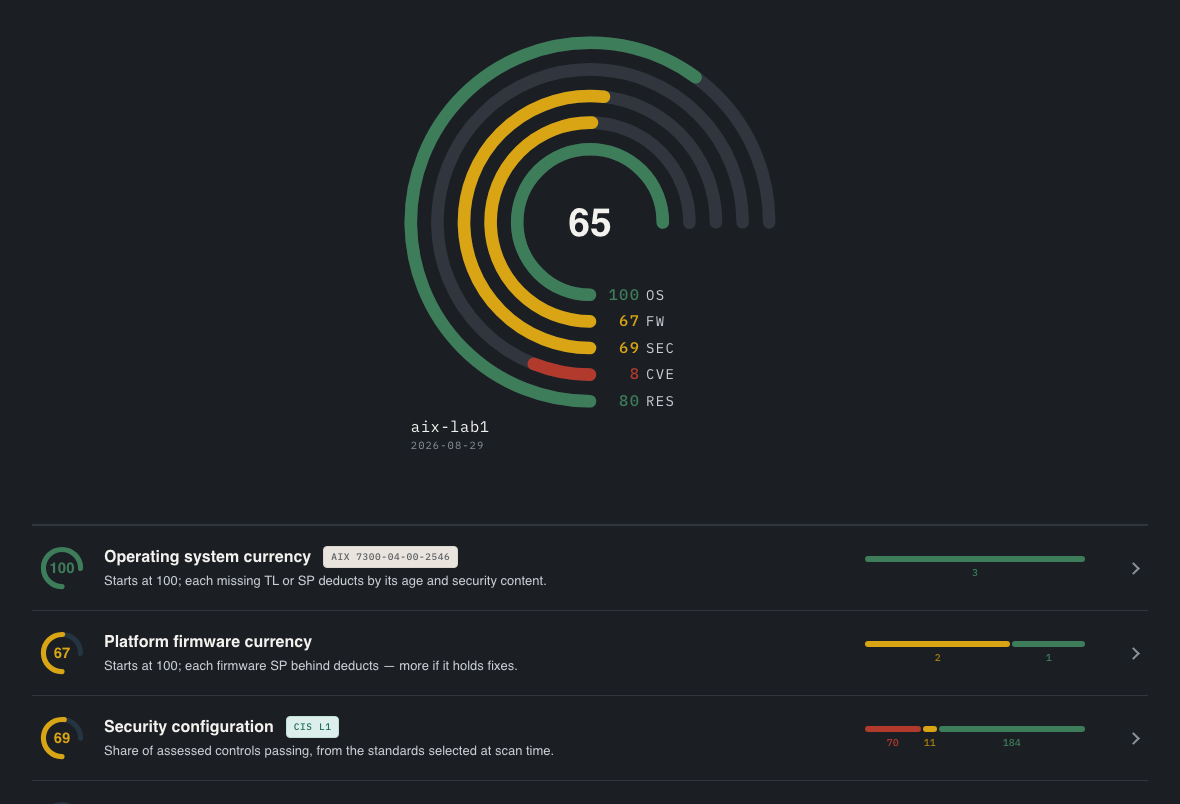 See a real PTxray report · lab AIX, fake names
Sample from an earlier PTxray version.
Upload your PTxray report and we build your Black Box Blueprint: every step in order, every command, a back-out for each change. Free, no obligation, and you keep it.